November 20, 2025
Why Proyex is the better choice when working with clients

The market is full of tools that are supposedly supposed to make your life easier. Project boards with integrated AI that sort your to-do lists, chat tools that are supposed to make communication even more relaxed, and collaboration portals that are supposed to automate teamwork. And at some point, you ask yourself: "Do I really need all of this?"
In reality, most freelancers and agencies simply jump from one tool to the next in their work. From Trello to Asana, from Notion to Google Drive, from Slack to WhatsApp, and in the end, your clients are still sending you 1000 emails with questions.
So you are not alone in wondering which tool is really the right one for your client projects.
Therefore, in this article, we will take a closer look at the variety of tools and explain to you why less is more in the end.
Most tools create more work for you, not less
Many tools promise to make your workday easier. This promise is usually only partially fulfilled. Because often, you customize your tool, give your clients access, but in the end, all questions land back in your email or WhatsApp.
Why?
Because most tools are built for internal teams. Not for freelancers, small agencies, or coaches who work directly with clients.
So often the following happens:
Too many functions but no real system
Most tools are completely overloaded, which also leads to your clients preferring to switch back to WhatsApp or email. Your clients feel overwhelmed in a new system, even though you spent a lot of time explaining the tool instead of actually working. The structure you need gets lost in features you will never use.
Everything is too spread out
Often your files in such tools are everywhere and nowhere. In the end, they are sadly not findable again, even though you were sure that you saved that specific file in that particular folder.
Information is spread across different systems.
Clients send you files in three different places.
Feedback gets lost or comes too late.
You are constantly looking for something you saved yesterday.
Clients do not use tools the way you need them to
As already mentioned, many tools are made for internal teams and are much more professional than clients really need. Because your clients want to quickly see an overview of the current status and don’t want to create a new account for everything.
In the end, you still receive emails from everyone, and you have to gather information from all directions.
No matter how good your project tool is, if your client doesn’t use it in the end, it is of no use to you.
Why Trello, Asana, and Co. reach their limits
All major project tools like Trello and Asana were not built to work with clients. And they were also not built to cooperate in small teams or to work alone as freelancers.
Trello and Asana: Good for teams, bad for client projects
Internally, it may work out fine with Trello and Asana. But as soon as clients are invited, problems arise:
Clients see tasks that do not interest them.
They do not understand the structure.
They click through boards and lists and do not know where to start.
What seems logical to you in these tools feels overwhelming and too technical to clients.
"The best Asana alternatives for small agencies" can be found here.
Notion and Google Drive: Plenty of space, but no clarity
With Notion and Google Drive, you have a lot of freedom, but little structure. Of course, you can create your own structure, but many pages, folders, and subfolders can quickly become chaotic in Google Drive.
Your clients will surely ask you questions like:
"Where can I find the final version again?"
"Was that the correct document?"
"Why are there two folders with the same name?"
Slack, WhatsApp, and Email: Communication that gets lost
Instead of using a complicated tool, your clients would prefer to opt for a quick WhatsApp message. But let's be honest, receiving files via a phone photo from your clients with questions may seem quite easy and relaxed at first. But WhatsApp and Co. are not tools for communicating with clients and leaving a professional impression. It may be sufficient for a quick coordination, but for long-term client communication with the exchange of multiple projects and files, it is simply incomprehensible.
In the end, you are again the person who has to sort through all the files from the chat chaos.
What really helps you?
What do you really need to work with clients in a relaxed and professional manner?
Actually, you do not need more tools that are supposed to improve your work life.
But less.
Because in the end, it is not about using as many features as possible, but about you:
Having information in one place
Clients understanding at a glance what is going on
Keeping communication comprehensible
Having to explain less
Projects progressing faster
In short:
You need a system that simplifies your daily routine and not one that you have to explain to your client for half an hour first.
Clarity beats complexity.
There are tools that are made exactly for that. For freelancers, agencies, or coaches.
And one of those tools is: Proyex.
A central place for everything
Proyex is like your digital assistant.
Everything you and your client need is located in Proyex in one central place. Every client gets their own project.
It contains the following functions:
💬 A chat that saves you third-party tools like WhatsApp, Slack, and Co.
🗂️ Tasks and milestones with deadlines, which can be marked as Open / In Progress / Blocked / Done.
"What is a milestone in client projects?" can be read here.
🧩 A Kanban board where tasks can be managed via drag and drop, perfect for those who prefer this overview.
📋 A table as an optional overview of tasks.
📁 Files with subfolders that can be uploaded in any format up to 8GB.
🔄 Revisions to keep feedback loops neatly organized.
If you want to know how to best handle feedback, read here: "The best tips for a productive feedback culture."
⚙️ General settings about the project and client information.
👥 Guests to add new people to the project. (Your client does not need to register separately; they simply receive an invitation via email.)
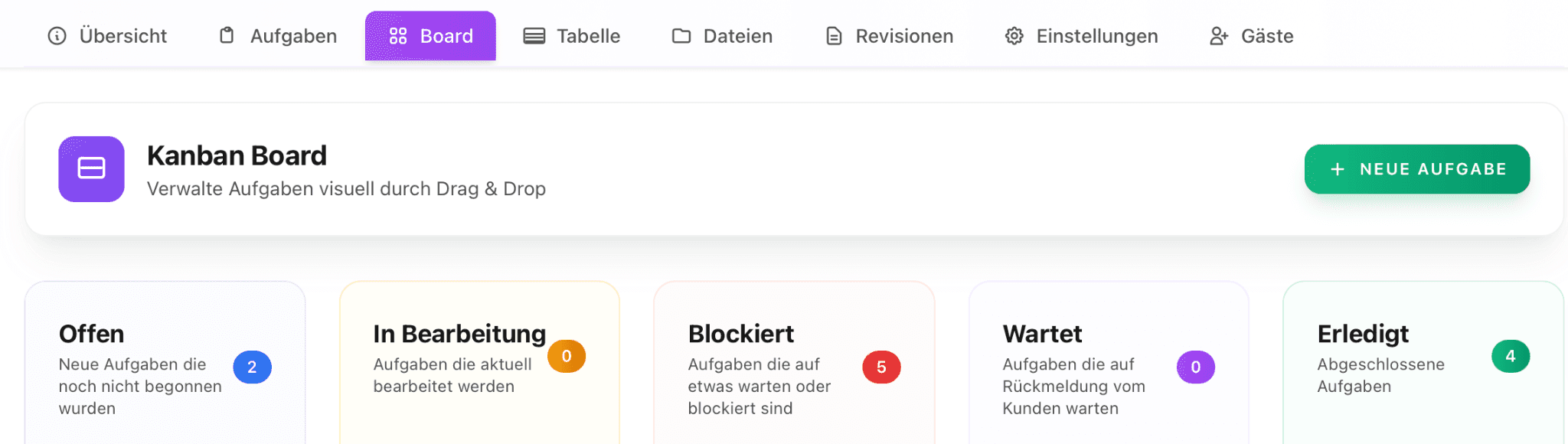
Project overview of your client project in Proyex
You do not need to connect 10 tools together. It’s all simply there.
Clear structures are also understood by your clients
With a clear project design, your clients also understand the project without much explanation.
This brings calm.
For you, because you have to explain less.
For clients, because they finally grasp how the project is going without technical frustration.
How to structure everything correctly can be found here: "How to organize client projects in a tool - without chaos."
Features that simplify your own workflow
A central place for everything not only means that client projects are set up and structured neatly, but you also benefit enormously from it in your daily life. Because in addition to project-related functions, there are a number of features that significantly simplify your internal organization, teamwork, and personal planning.
These include:
🏠 Your dashboard with general tasks, team activities, and your milestones.
🗂️ Tasks with filter options, sortable by status, tasks, due date, responsible person, project, and creation date.
📁 An overview of all projects, also with filter options and search functions.
📦 Digital deliveries with open feedback, accepted, or rejected projects.
🧱 Project templates so you do not have to set up each project from scratch. You can simply save projects as project templates in your templates.
🎥 A media library with explanatory videos for the entire team.
💬 Internal chat functions to avoid third-party providers like Slack when communicating within the team.
🏷️ Manageable project tags to have an overview of which client has booked which type of project.
⏱️ Time tracking to track your working hours and assign them to a project.
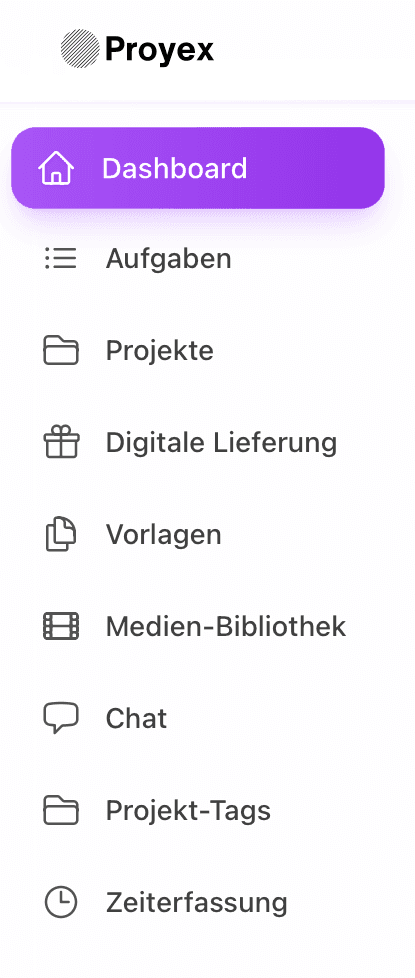
Menu overview in Proyex
Proyex is therefore not just a client portal, but also your personal organization system that brings your entire business day together in one place.
Conclusion: Fewer tools make the difference
To be honest, no one needs another tool that has to be explained or that causes more chaos than it solves.
Proyex is designed to make your collaboration with clients simple without detours and extra effort. Just a tool that does exactly what it is supposed to do.
So if you wish to handle projects more calmly, clearly, and stress-free, it is worth trying Proyex. And the best part is that it is even free.
Register now and try it out for yourself.
Free task management?
Use the free version of Proyex without time limits. Try it out now and organize your tasks like over 100 other teams with Proyex.




📩 Save 10% on your first Proyex plan.
Sign up for our newsletter and stay up to date – with tips, updates & exclusive offers.